👩
👨
🚀
🌸
❤️
🏡

The family app that actually works

Your family runs better with a command center.

Schedules, chores, rewards, routines, connection time, and finances — all in one place every family member can see and love. Less chaos. More together.

14
Features built
for real families
Free
To start today
no card needed
1
App your whole
family will love
Family Basecamp
👩
Sarah
Parent · Kin active
👨
Mike
Parent · Campfire host
🚀
Liam
⭐ 47 stars · Flame tier
🌸
Emma
⭐ 38 stars · Ember tier

Sound familiar?

Family life is beautiful.
Coordinating it shouldn't be this hard.

😤
"Did someone eat breakfast?!"
Morning routines that depend entirely on you repeating yourself four times before 7:45am.
📅
"When is that appointment again?"
Schedules living in three different apps, two group chats, and one sticky note you can't find.
💸
"We need to talk about money."
Big financial decisions that never get made because there's no shared space to work through them.
🧹
"You STILL haven't done your chores."
Chore systems that collapse after two weeks because nobody remembers what's expected.
💑
"When did we last really talk?"
Couple connection that gets squeezed out by a full calendar and four small humans.
🌀
The mental load never stops.
One parent carrying the entire map of the family in their head. Alone. Exhausted.

Family Basecamp puts the whole map in one place — and gives everyone a job to do.

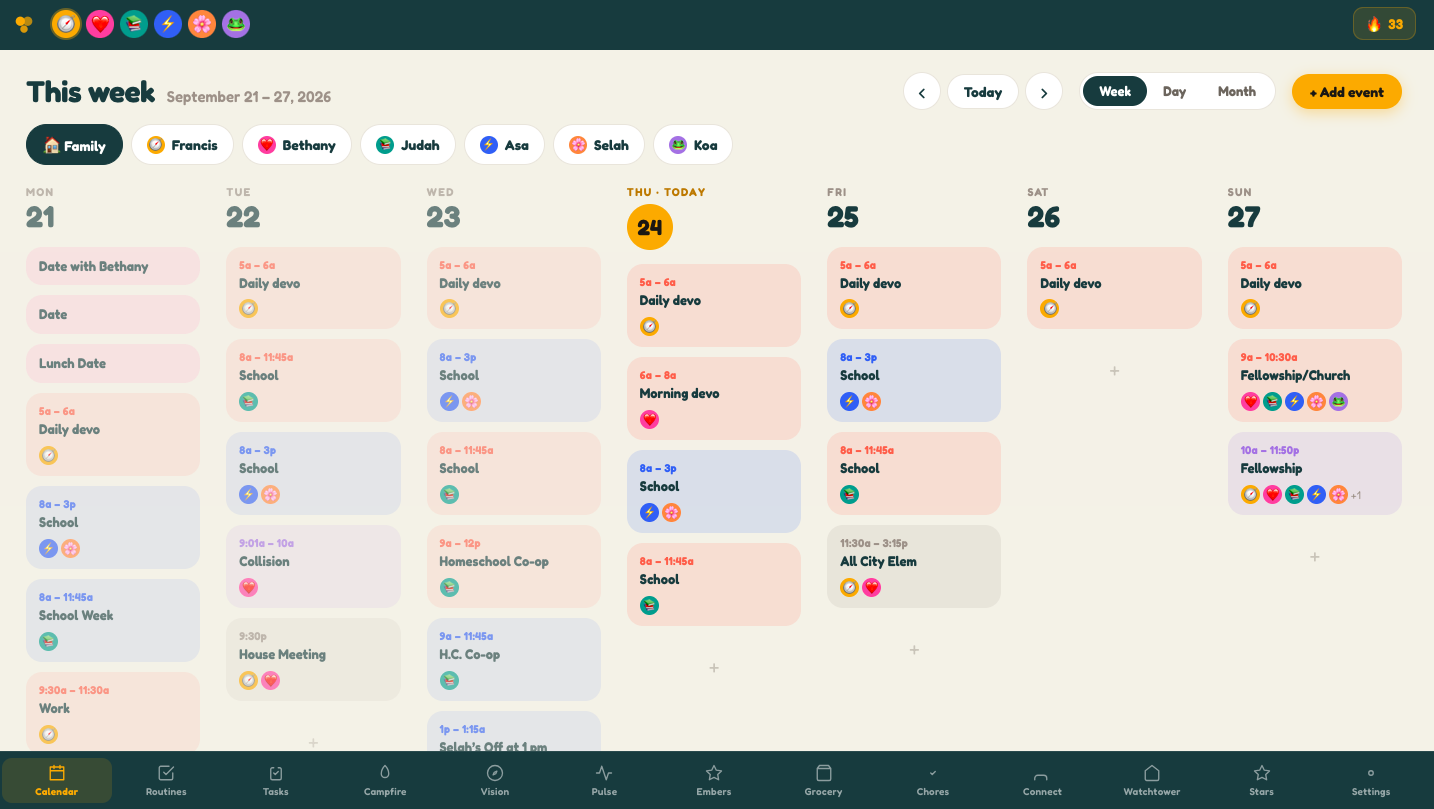
Smart Calendar

One calendar. Every person. Zero confusion.

Every family member gets their own color, their own icon, and their own filtered view. Privacy-lock surprises with a 4-digit code — everyone else just sees "Reserved."

Color-coded per family member with fun icons kids love
Family-wide view + individual filtered views
Conflict detection warns before double-booking
Surprise lock — plan a birthday trip without spoiling it
Paste any text and AI extracts events automatically
📅 Family Calendar June 24
👨‍👩‍👧‍👦 All 🚀 Liam 🌸 Emma
⚽ Soccer Practice
Liam · 5:30 PM
💑 Date Night
Sarah & Mike · 7:00 PM
🔒 Reserved
Private event
🚀 Liam's Morning Routine by 7:45 AM
Brush teeth
Get dressed
Make bed
Eat breakfast REQUIRED
Pack backpack
⭐ Complete all required items to earn 3 stars!

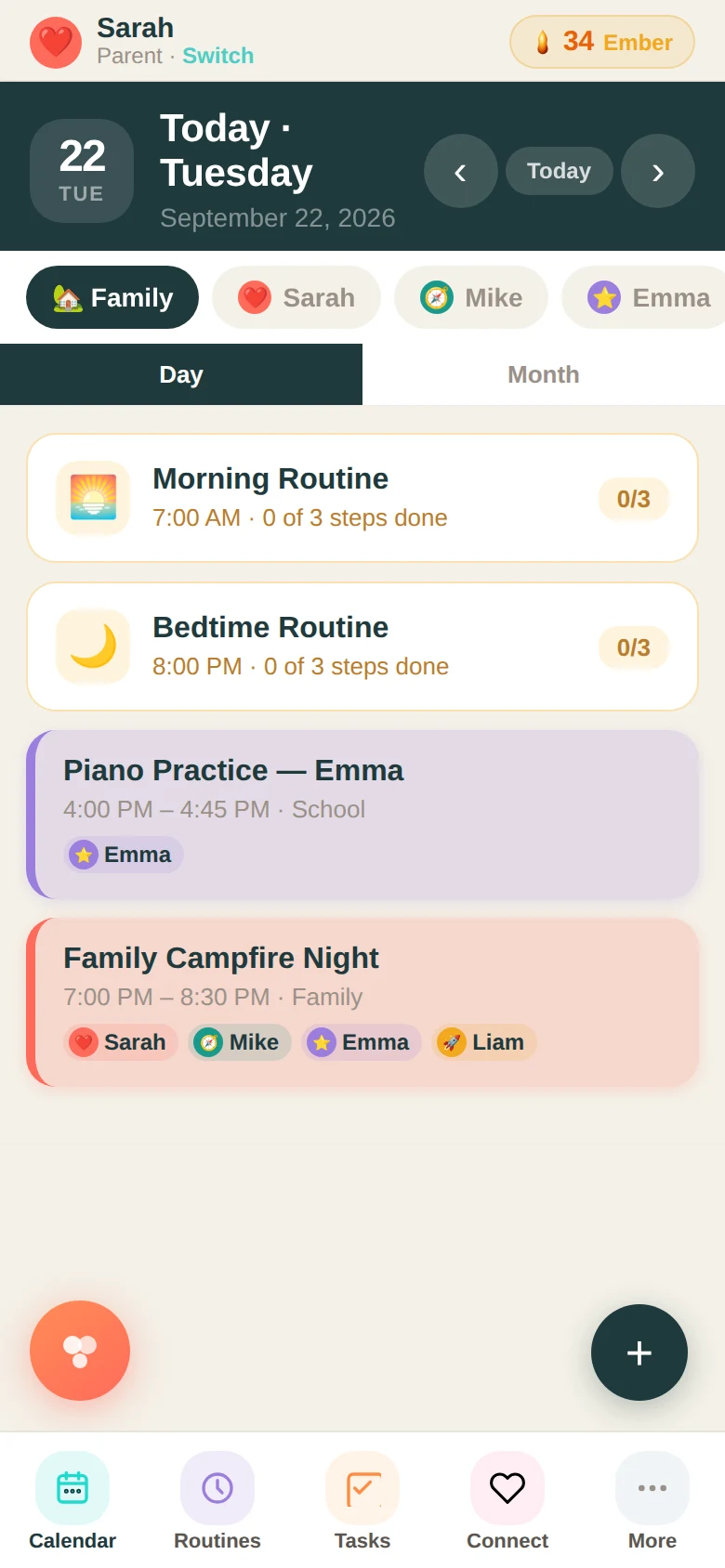
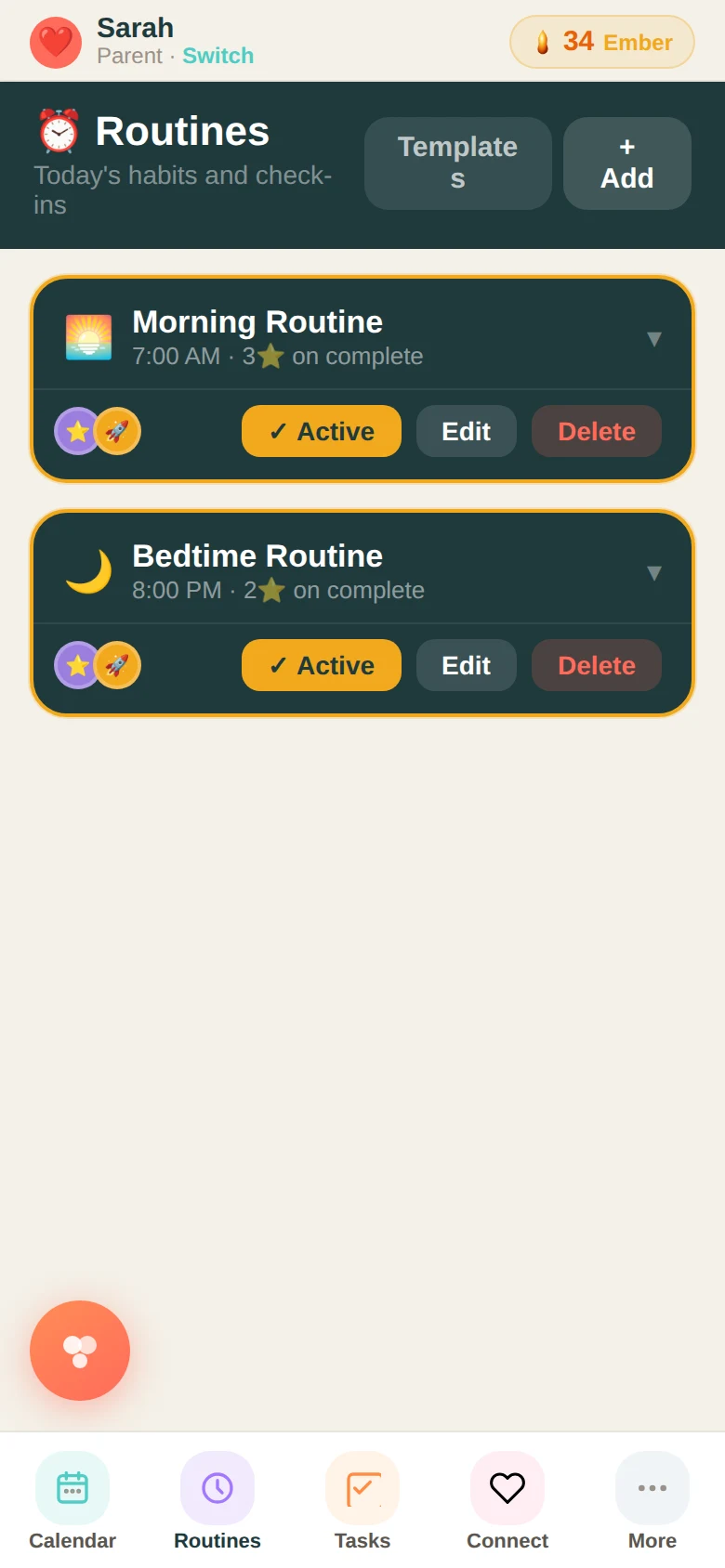
Daily Stations

Morning chaos to morning flow.

Bedtime. School mornings. Going out. Each station is a time-based checklist kids own themselves. Complete everything and earn stars automatically.

Required vs. optional items — kids know what matters
Stars auto-awarded when required steps are done on time
Going Out list — water bottle, bathroom, shoes on
Parents see all kids' progress at a glance

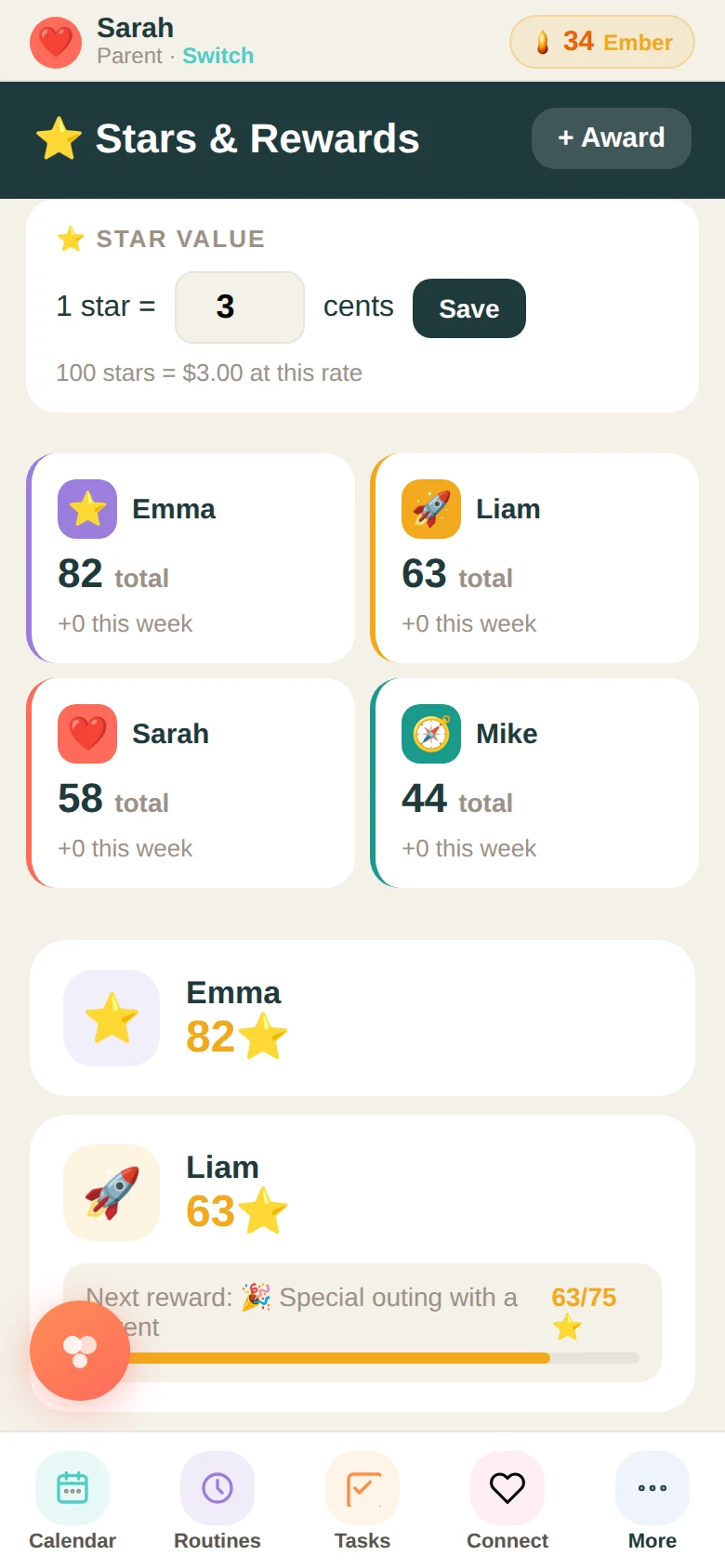
Stars & Goals

Turn good behavior into something they're working toward.

Every completed routine and approved chore earns stars. Kids track their progress toward a real goal. Parents set the star value — from movie night picks to real cash.

Individual star counts per child — always visible
Goal progress bars with milestones they help set
Family goals where every kid contributes together
Star Store — kids redeem for rewards parents define
Set star cash value: 5¢, 10¢, 25¢, or $1.00 per star
⭐ Stars & Goals
🚀
Liam
47⭐
🌸
Emma
38⭐
🎬 Movie Night Pick — Liam
🗺️ Family Adventure Trip · 38 stars to go
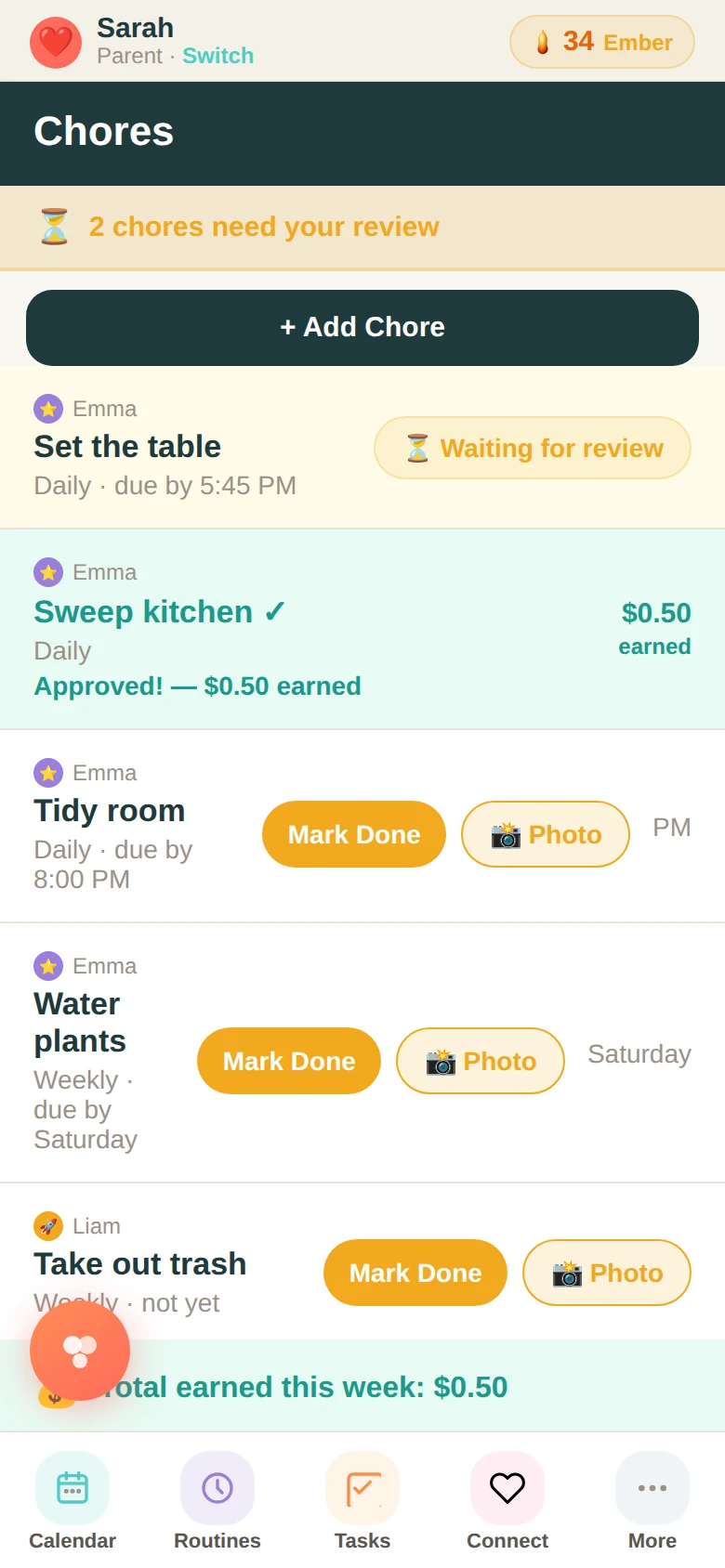
✅ Emma's Chores 1 pending review
Set the table Daily · 5:45 PM
⏳ Awaiting parent review
Sweep kitchen ✓
Approved! On Time ★★★ · Quality ★★ · Attitude ★★★
Tidy room by 8:00 PM
not yet

Chores System

Rated on deadline, quality, and attitude.

Kids mark chores done. Parents review and rate them on three dimensions. Some chores earn real money, tracked with a dollar badge. Every rating teaches, not just rewards.

3-dimension rating: On Time · Quality · Attitude
Money-earning chores with exact dollar amounts
Parents see a pending review queue automatically
Stars deposited on approval — fully automatic

Connection + Finance

For the couple running the whole show.

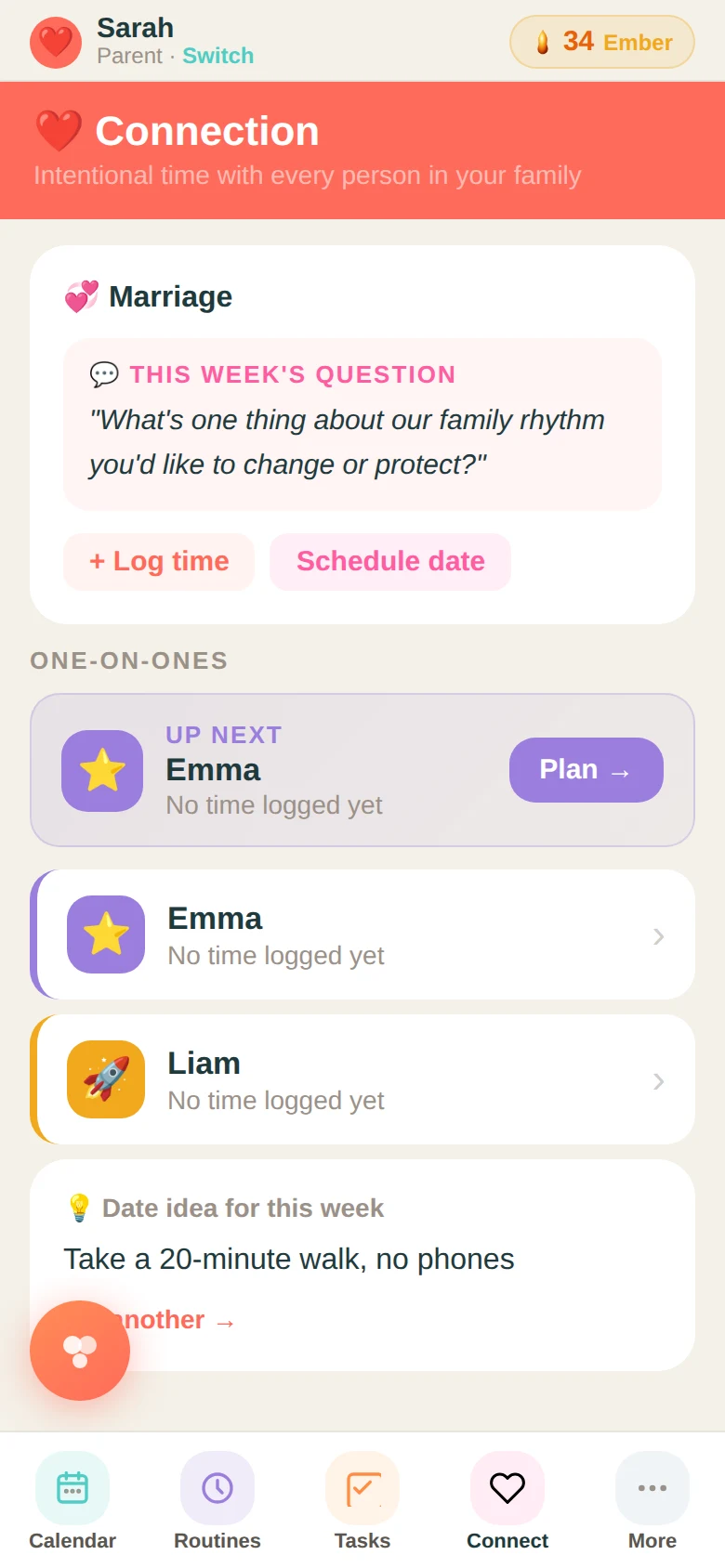
A rotating one-on-one tracker for each kid, a locked-in weekly date slot with rotating suggestions, and a finance board that turns overwhelming decisions into actionable steps.

Daily couple check-in + weekly date time with ideas
One-on-one rotation — no kid gets forgotten
Finance decisions: Now / 2–6 Weeks / Long Term
Kids never see finance or couple data — parent-only
❤️ Connection
💑 Date Night · Wed 7:00 PM
"Cook a new recipe together"
Kid One-on-Ones
🚀 Liam 🌸 Emma ← next
💰 Finance — Now
New car decision

Kin — Your Family's AI

An AI that actually knows your family.

Kin is Family Basecamp's built-in AI assistant — designed specifically for family life. Parents get full access. Kids get a safe, parent-controlled experience with trust levels you set.

Helps parents plan, import events, and think through decisions
Kids must request Kin sessions — parents approve with optional time limits
Hard content scope wall — kids can only discuss app topics
Three trust levels per child: Supervised, Trusted, Open
Weekly digest of all family Kin activity sent to parents
Kin
Your family's AI guide
Child trust levels — set per child in Settings
🔒 Supervised
Every session requires parent approval
🔓 Trusted
App topics open — extended sessions auto-approved up to 15 min
✅ Open
Full access with weekly parent digest
🔔 Liam is requesting a Kin session — "Help with my book report"
🔥
Tonight's Campfire
Tonight's question
"What made you laugh this week?"
Stars per member: 4⭐ · +2 Embers earned as a family
👩 Sarah ✓
👨 Mike ✓
🚀 Liam ✓
Emma — tap to check in

Campfire — Family Devotion

The weekly gathering that changes everything.

A parent starts a Campfire session with a rotating question. The family gathers — around the hub tablet in the kitchen, or wherever they are. Everyone shares. Everyone checks in. Stars are awarded automatically to everyone who shows up.

10 rotating questions — or create your own
Parents set stars per session (2–5) and shuffle questions
Every participant earns stars instantly on check-in
Campfire completion earns Embers for the family legacy ledger
Full history logged — every session, every question, who showed up

Ember — The Legacy Layer

The families who build this community own a piece of it.

525,600 Embers — one for every minute in a year. The number that will ever exist. Earned by families showing up together. Never purchased. Never spent. A permanent blockchain record of intentional family living.

Learn more at ember.family →
Spark
1–9 Embers
The fire is starting.
Ember
10–49 Embers
The fire is real.
Flame
50–149 Embers
The fire is sustaining.
Blue Cone
150–299 Embers
The hottest combustion.
Emunah
300+ Embers
Faithfulness proven over time.

Blue Cone and Emunah families receive soulbound NFTs and quarterly revenue distributions via Flare smart contract · ember.family

Hub Mode — Ambient Display

Your kitchen screen, alive with your family's life.

After two minutes of inactivity, Family Basecamp transforms into a beautiful full-screen ambient display. Cards rotate every six seconds — upcoming events, chore reminders, star counts, family goals, connection prompts.

Activates automatically after 2 minutes of no touch
Rotates through events, chores, stars, goals, and prompts
Large clock always visible — the family's shared timepiece
Touch anywhere to return instantly to the full app
Preview anytime from Settings → Preview Hub
7:42 PM
Tuesday, June 24
Soccer Practice
Liam · Tomorrow at 5:30 PM
Touch anywhere to return to app

Setup in minutes

Up and running before dinner.

No downloads. No installs. Just open the link.

1
Open the app
Family Basecamp runs in your browser — phone, tablet, or computer. Bookmark it, add to your home screen, or mount a tablet in the kitchen.
2
Create your family
Enter a few names and pick an emoji for each person. You get a unique family code. Share it with your family and everyone syncs instantly.
3
The whole family is synced
One update is instantly visible to everyone. Schedule something on your phone — the kitchen tablet updates automatically. That's it.

Real families

From "I can't keep up" to "we've got this."

⭐⭐⭐⭐⭐

"Mornings used to end with someone crying — usually me. The routine station completely changed our before-school game. The kids actually race to check off items now."

B
Brittany M.
Mom of 3 · Memphis, TN
⭐⭐⭐⭐⭐

"The Campfire feature changed our Tuesday nights. My son actually asked to do it last week before I brought it up. That's never happened with anything before."

M
Marcus T.
Dad of 2 · Atlanta, GA
⭐⭐⭐⭐⭐

"We put it on a Fire tablet mounted in the kitchen. Best decision all year. The kids check it every morning without being asked. The mental load I've handed off is real."

P
Priya T.
Mom of 4 · Portland, OR

Testimonials from beta families. Names are representative.

Simple pricing

The whole family. One plan.

Start free. Upgrade when you're ready for more.

Free
Try it with your family. No credit card.
$0
Free forever
Calendar — up to 3 members
Basic routines
Stars & chores
10 Kin sessions per month
Get started free
Basecamp Pro
For families building long-term legacy.
$14.99/mo
or $119/year — save 34%
Everything in Family Plan
Unlimited Kin for all family members
Kin Extended — family trend insights
Priority Ember earning rate
Early access to new features
Priority support
Dedicated onboarding call
Start free trial

14-day free trial · No credit card required

The Family Hub Setup

One screen in the kitchen changes everything.

A wall-mounted tablet becomes your family's shared command center — always on, always current. Every device that opens your Family Basecamp link stays in perfect sync automatically.

🔥
Amazon Fire HD 10 Tablet (2023) — Best for Kitchen Hub
10.1" HD display. Perfect mounted at eye level. Great for Hub Mode ambient display the whole family can see.
Shop on Amazon →
🔥
Amazon Fire HD 8 Tablet — Best for Kids' Rooms
Lightweight, kid-durable, affordable. Set one up in each child's room for their personal routine station.
Shop on Amazon →
🔩
Adjustable Tablet Wall Mount Stand
Flush-mount your hub tablet to the wall. Swivel, tilt, and stay plugged in — no more propping it on the counter.
Shop on Amazon →
Complete Family Hub Kit — Best Value Bundle
Fire HD 10 + wall mount + case. Everything you need to go from phone-only to a dedicated always-on command center.
Build your bundle →

We earn a small commission on Amazon purchases at no extra cost to you. Every dollar helps keep Family Basecamp growing. Replace familybasecamp-20 with your actual Amazon Associates tag.

Your family deserves a command center.

Set up in minutes. Free to start. The whole family involved from day one.

Open Family Basecamp Free → Get a Family Hub Tablet

No download required · Works on any device · Syncs across your whole family